

The Evolving Artist
Ideas for artists building a professional online presence as their practice grows.
art practice + career evolution + online presence + presentation
Popular Posts


Unlocking SEO for Artists: Crafting and Optimizing Your Blog Posts on Squarespace 7.1
In this post, I’ll be covering how to effectively prepare your blog posts for publishing inside Squarespace 7.1. I'll cover how to create your post, but more importantly, to how to use categories, tags, and SEO descriptions to improve your overall site SEO. Plus, I've included a helpful video tutorial to visually guide you through the process. Whether you're new to Squarespace or want to enhance your current blogging skills, this post has you covered.

Step-by-Step Tutorial: How to Create a Custom "Link in Bio" Page for Instagram on Squarespace
In the ever-evolving world of social media, it's helpful to create a custom links page on your Squarespace website. A custom links page allows you to showcase multiple links in one place, making it easier for your followers to explore your artwork, content, products, or services. In this step-by-step guide, we'll walk you through the process of creating a custom links page for your Instagram profile on Squarespace.

Three Simple Ways to Customize the Built-in Domain in Squarespace
When it comes to building a website, creating a unique and memorable online identity is crucial. One important aspect of establishing your brand's presence is having a custom domain name. You’ll have 3 options when it comes to customizing your built-in domain in Squarespace (purchase a new domain, connect an existing domain, or update the Squarespace built-in domain. In this post, we’ll walk through each of those options, and how to set them up inside Squarespace 7.1, step-by-step.

Enhancing Your Artist Portfolio Website: Unleashing the Power of Creative Pop-Ups
As artists, it's essential to capture the attention of our audience and cultivate a loyal following. In this post we're going to explore a powerful yet often overlooked resource for building your email list: promotional pop-ups. Prepare to discover a variety of pop-up ideas that will encourage site visitors to join your artistic community. It's time to embrace this underutilized resource and watch your list-building efforts thrive!

How to Set Up a Pop-Up in Squarespace 7.1: Step-by-Step Guide
Pop-ups are a powerful tool for capturing visitor attention, promoting special offers, and growing your email list. If you're using Squarespace 7.1, you're in luck! Squarespace makes it easy to set up pop-ups without any coding knowledge. In this step-by-step tutorial, we'll guide you through the process of creating a pop-up within your Squarespace website.

How to Add Your Instagram Feed to Your Squarespace Site
In this step-by-step video tutorial, I'll show you how to effortlessly add your Instagram feed to your Squarespace 7.1 site, enabling you to display your latest posts to your site visitors in a beautiful and consistent manner.

10 Good Reasons to Hire a Squarespace Web Designer
As an artist, your website is your online portfolio, your storefront, and your digital representation to the world. It's essential to make sure that it looks professional, engaging, and easy to use. That's where a Squarespace web designer comes in. Here are ten reasons why you should consider hiring a Squarespace web designer for your website.

How to Customize Your Browser Icon in Squarespace 7.1
In this post, we're diving into the art of customizing your browser icon or Favicon, in Squarespace 7.1. This is a small detail that sets professional websites apart from the amateurs, so if you don’t have one yet, there is no better time! It's easy to do. Inside you'll find a step-by-step tutorial on creating a simple custom browser icon or favicon in the free version of Canva, and uploading it to your Squarespace 7.1 website.

From Ordinary to Extraordinary: Elevating Your Portfolio Website with Expert Insights
Are you eager to make your portfolio website the best it can be? I've got some valuable insights to share with you. In this blog post, we're going to focus on the key areas that will make your portfolio website shine and leave a lasting impression on your visitors. From design elements to content strategies, we'll explore essential aspects, in the form of tips, that can help transform your website from ordinary to extraordinary.
Connecting with Your Audience: Visual Artists Who Lead with Authenticity
As a visual artist, the process of creating something meaningful and beautiful is what drives you. But when it comes to promoting your work, finding the right balance between self-promotion and being genuine can be a challenge. You don't want to feel like a pushy salesperson or risk turning off potential customers. So, how can you market your work to your audience in an authentic way? In this post, we'll explore inspiring examples of artists that lead with authenticity.

10 Leading Online Marketplaces for Artists: A Comparison
In this post, I provide a brief comparison of 10 leading art marketplaces, including popular platforms like Etsy, RedBubble, Saatchi Art, Artfinder, and more. We'll examine the benefits and drawbacks of each platform, as well as the associated costs and fees, to help you make an informed decision and find the best platform for your art.

The Power of Chat GPT for Fine Artists Seeking Gallery Representation
In this blog post, I explore how the power of AI, and specifically Chat GPT, can be used to gather important information about ideal customers. To put the tool to the test, I used a simple ‘role play’ prompt and a ‘conversation’ between an artist and the head of a leading art gallery in New York or LA, to try to bring some clarity to what this ideal client might be searching for when it comes to adding an artist to the gallery roster.

“Can Squarespace Host My Domain?” What You Need to Know
One of the questions I get from clients who have an existing site is “Can Squarespace host my domain? The answer is yes. But, you need to know that you have 2 options. The first option is to transfer your domain to Squarespace when you launch your new site. The second option is to keep your domain with your existing registrar and connect to it from your new site. In this post, we’ll review each of these options.

Telling Your Story Through Images: Planning Ahead for a Meaningful Photoshoot
If you’re in the process of creating/revamping a website or social media, it helps to get organized when it comes to planning a photoshoot that will yield a range of images for your creative business.
Whether you are taking the images yourself, enlisting the help of a friend, or hiring a professional photographer, planning ahead for a photo shoot also allows you to think carefully about what you would like your pictures to convey about yourself as an artist.
This post is designed to help you think about incorporating a broader range of imagery that can help capture the attention of your audience and set the tone for the kind of relationship you’d like to have with your fans and collectors.

Leaving Mailchimp, and Ready to Step-Up Your Email Marketing Game?
Email marketing is, hands down, one of the most powerful tools you can use in your creative business. A well-maintained email list can drive traffic to your website, help attract potential new fans and customers to your work, and boost your overall revenue. However, as you may have heard, Mailchimp recently announced a major change to its pricing plans that may make it more difficult for small business owners to fully take advantage of the power of email marketing.

How to Customize a Free Lead Magnet Template for Visual Artists, in Canva: Step-by-Step Instructions.
As a creative business owner, I know, from first-hand experience one of the things we all struggle with at one time or another is building an email list. And, because I work with a lot of artists, I know that coming up with a lead magnet (or opt-in freebie) that is right for their particular audience can be challenging. I got to work, and created a lead magnet specifically for visual artists that is better aligned with what you do, and also addresses an audience ‘pain point’ or FAQ. In this post, I provide step-by-step instructions on how to customize the shared template inside Canva.

Etsy Versus Squarespace: Which one is right for you?
One of the things I sometimes get asked by illustrators and designers who are considering launching their own website with Squarespace is “how does this compare to Etsy?” In this post, I provide a side-by-side comparison of Squarespace and Etsy to help you figure out what would work best for your creative business.

Are You Using These Email Marketing Features to Powerfully Level-Up Your Newsletter?
You’re probably already using an email marketing service in your business as a way to share your new works and launch special promotions with your subscribers. However, you may not be taking advantage of some of the lesser known and newer features that are available to make your newsletter the best it can be — both in presentation and in performance. In this post, I provide three email marketing features that will help you power up your newsletter.

Three Ways to Easily Embed a PDF in Squarespace 7.1
Here is a step-by-step video tutorial that goes over three ways you can embed a PDF document in your Squarespace 7.1. website.
Should Artists Include a Hero Statement On Their Portfolio Website?
Did you know that adding a hero statement to your portfolio website can help to retain first-time visitors AND improve your site’s SEO?! Because it contains all the information a person needs in order to know if you and your work are right for them, it is a simple way to retain visitors who are discovering you, and your work, for the first time.
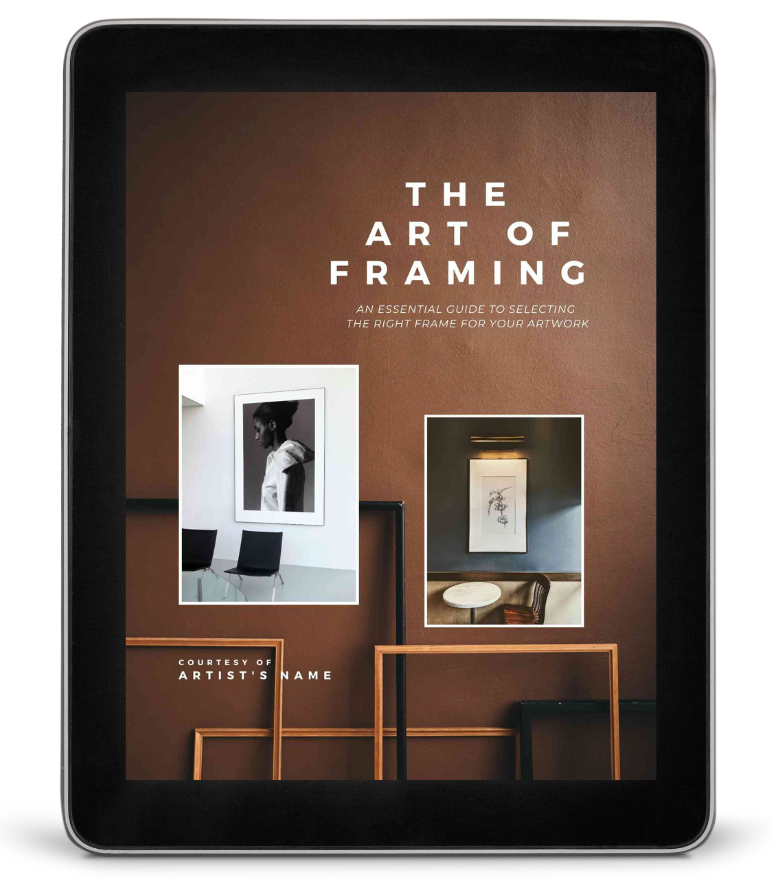
Free Customizable Lead Magnet for Visual Artists: Framing Guide
Build your email list with this pre-written, beautifully designed 14-page editable Canva template. Give your fans and art collectors a framing guide, with expert recommendations and resources. Customize as much or as little as you want.
Drag and drop images of your own work into the document;
Modify the color palette with your brand colors;
Edit the text as desired.
Or, simply personalize the guide by adding your name and contact information. It’s all ready to go, so it really is THAT easy!